
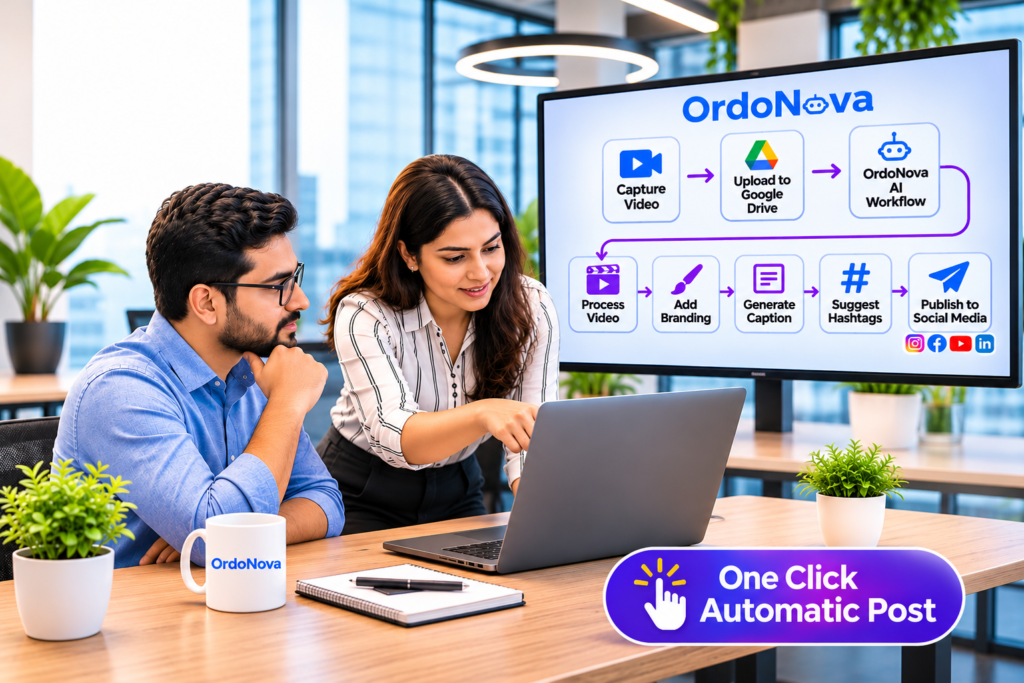
From raw footage to published Reel
- Capture
- Upload
- AI processing
- Editing
- Branding
- Captions and hashtags
- Publish
Creating Instagram Reels regularly can take hours. Businesses need to record videos, transfer files, edit footage, add branding, create thumbnails, write captions, find hashtags, and publish content on Instagram and Facebook.
What if you could start this entire process with just a simple video upload?
With OrdoNova AI, businesses can connect their applications and create automated workflows that handle repetitive social media content tasks. Instead of manually editing and publishing every video, you can upload your raw footage to Google Drive and let your configured OrdoNova workflow take care of the next steps.
Let’s understand how it works.
1. Why does social media content creation take so much time?
Traditionally, businesses follow several steps to publish one Instagram Reel.
- Record videos using a smartphone or camera.
- Transfer videos to a computer.
- Open video editing software.
- Trim and arrange video clips.
- Add company logos and branding.
- Create an attractive thumbnail.
- Write captions and descriptions.
- Search for relevant hashtags.
- Prepare content for Instagram and Facebook.
- Upload and publish posts manually.
Every new video requires repeating these tasks. For businesses publishing content daily, this can become a time-consuming process.
2. With OrdoNova: turn your manual process into an AI-powered workflow
Now imagine a different process. You capture a video, upload the raw file to your connected Google Drive folder, and OrdoNova starts your configured automated workflow. Connected AI tools and application integrations handle the subsequent tasks.
Your new process
- Capture
- Upload
- AI processing
- Video editing
- Branding
- Caption & hashtags
- Instagram & Facebook publishing
1. Capture your video in real time: Record your video or take photos using your smartphone or camera. You don’t need to open multiple editing applications or prepare the content manually.
2. Upload your video to Google Drive in approximately 2 minutes: Upload your raw video or photo to your connected Google Drive folder. This is the starting point of your OrdoNova workflow.
3. OrdoNova automatically detects new media: Your configured workflow checks the connected Google Drive folder and identifies eligible new files. Once a new file is detected, the workflow starts the next automated tasks.
4. Automatically process and edit your video: Connected AI and video-processing tools can prepare your footage for social media. Depending on your workflow configuration, this can include:
- Selecting important video highlights.
- Removing unnecessary footage.
- Trimming and arranging video clips.
- Preparing Instagram Reel formats.
- Adding promotional text.
- Applying video transitions.
5. Automatically add your business branding
Your videos should look consistent with your business identity. Since you are using this workflow for the first time, add your business branding details once. After that, the workflow will automatically apply them to every video.
- Business details: Add your business name, logo, brand colors and branding guidelines once.
- Automatic branding: Apply the saved business branding to every uploaded video automatically.
- Promotional messages: Automatically include relevant promotional messages based on the video content.
- Branded video elements: Maintain consistent branding, text styles and visual elements across all Reels.
- Video thumbnails: Automatically select the best video frame based on timestamps and generate a thumbnail at the appropriate time, with branding when required.
- Automatic generation: Once configured, process every new video automatically without manually setting up branding each time.
6. Generate captions and hashtags using AI
Writing captions for every video takes time. First, connect the ChatGPT Agent and add your business details once. After setup, the agent automatically analyzes each uploaded video and generates captions based on the video content.
- Add your business details once.
- Automatically analyze each uploaded video.
- Generate captions relevant to the video.
- Suggest 5 relevant hashtags.
- Include a call to action when needed.
This makes caption writing and video publishing easier and faster.
7. Automatically publish to Instagram and Facebook
Once your content is ready, the workflow sends it to your connected social media publishing integrations. Depending on your configuration, OrdoNova can automate publishing to:
- Instagram Reels.
- Facebook Reels.
- Supported Facebook video posts.
You can configure publishing schedules and approval steps according to your business requirements. No need to repeat the same manual upload process for every video.
3. Manual process vs. OrdoNova AI automation
| Traditional process | With OrdoNova | AI agent or tool |
|---|---|---|
| Transfer files manually | Upload to connected Google Drive | Trigger agent |
| Open editing software | Automated processing workflow | Code agent |
| Edit videos manually | Configured video editing | Code agent |
| Add company logo manually | Automated branding | Code agent |
| Create thumbnails manually | Automatic thumbnail generation | Code agent |
| Write captions manually | AI-generated captions | ChatGPT agent |
| Search hashtags manually | AI-suggested relevant hashtags | ChatGPT agent |
| Post on Instagram manually | Automatic publishing | Instagram agent |
| Repeat every day | Reuse your automated workflow | OrdoNova automated workflow |
Instead of spending hours on repetitive tasks, start with a simple capture-and-upload process.
4. Who can use OrdoNova for social media automation?
Photographers and videographers
Capture wedding highlights, birthday celebrations, events, photoshoots, and behind-the-scenes videos. Automate content preparation and publishing.
Real estate businesses
Record property tours, house walkthroughs, new listings, and customer testimonials. Prepare branded promotional Reels.
Digital marketing agencies
Manage repetitive content operations for multiple clients, campaigns, and social media accounts.
Retail and e-commerce businesses
Capture product demonstrations, new arrivals, special offers, and promotional videos.
Restaurants and hotels
Record food preparation, customer experiences, events, and special offers for regular social media content.
Corporates
Share company events, employee activities, product launches, and business announcements.
5. Why should businesses automate social media content?
OrdoNova helps businesses create connected workflows for repetitive marketing activities. Key benefits include:
- Faster Content Creation & Publishing
- Less manual video editing
- Consistent business branding
- AI-assisted captions and hashtags
- Connected social media publishing
- Reusable workflows
- More time for business activities
6. The new way to manage social media content
Traditional process
11 steps, all by hand
- 1Capture video
- 2Transfer files
- 3Open editing software
- 4Edit video
- 5Add logo
- 6Create thumbnail
- 7Write caption
- 8Find hashtags
- 9Upload to Instagram
- 10Upload to Facebook
- 11Publish
With OrdoNova
2 steps, then automated
- 1Capture videoYou
- 2Upload to Google DriveYou
- 3OrdoNova AI workflowAuto
- 4Process videoAuto
- 5Add brandingAuto
- 6Generate captionAuto
- 7Suggest hashtagsAuto
- 8Publish to social mediaAuto
Set up your branding and business details once. Every new video follows the same workflow.
Your content workflow becomes simpler, more connected, and easier to repeat.
Capture more. Edit less. Automate your social media workflow.
Creating social media content shouldn’t require spending hours on the same repetitive tasks every day. Whether you are a photographer, real estate professional, marketing agency, or business owner, OrdoNova helps connect your applications and automate your configured workflow.
Start by recording your video and uploading it to Google Drive. Let connected AI tools and integrations handle video processing, branding, captions, hashtags, and social media publishing.
One upload. Multiple automated tasks. Less manual work.
Ready to automate your social media workflow?
Explore OrdoNova AI